For about six months I’ve been using a Raspberry Pi 3 as my desktop computer at home.
The overall experience is fine, but I had to do a few adjustments.
First was to use KeePass, the second to compile gcc for cross-compilation (ie use buildroot).
For about six months I’ve been using a Raspberry Pi 3 as my desktop computer at home.
The overall experience is fine, but I had to do a few adjustments.
First was to use KeePass, the second to compile gcc for cross-compilation (ie use buildroot).
Bon pour commencer, je n’ai pas demandé aux fabricants de m’offrir des cartes pour les tester, donc ce test est loin d’être exhaustif. En fait je ne compare que deux cartes !
Voila mon frère et moi avons acheté quelques cartes microSD SDHC 16G : une de marque SanDisk et une de marque Kingstone. Nous avons choisi des marques pour être à peu près sûrs d’avoir des performances correctes.
J’ai cherché à définir un protocole de test, copier des fichiers de différentes tailles… puis je suis tombé sur ce blog: MicroSD class 6 Performance Benchmarks. Il propose d’utiliser un outil présent dans le bureau GNOME: palimpsest.
Bon alors cet outil ne veut pas tester la carte si il y détecte une table des partitions, le blog cité précédemment propose d’effacer toute la flash avec la commande suivante:
dd if=/dev/zero of=/dev/sdb
Brutaliser de la sorte une carte SD n’est peut être pas ce qu’il y a de mieux à faire. Surtout quand l’on sait que l’état « effacé » d’une flash est avec tous ses bits à 1, écrire 0 partout revient en fait à la remplir plus qu’à l’effacer…
Mais bon j’y ai pas trop réfléchit quand j’ai fait le test, donc je suis parti la dessus:
sync; date; sudo time dd if=/dev/zero of=/dev/sdb; sync; date
Les appels à date permettent d’avoir une première estimation du temps d’écriture, en fait, dd donne aussi quelques statistiques donc c’était pas nécessaire.
Puis le test proprement dit:
LANG=C palimpsest
Attention au port USB utilisé pour le lecteur SDHC, si les traces du noyau (dmesg) contiennent la ligne suivante, il faut trouver un autre port !
not running at top speed; connect to a high speed hub
Bon, assez de blabla…
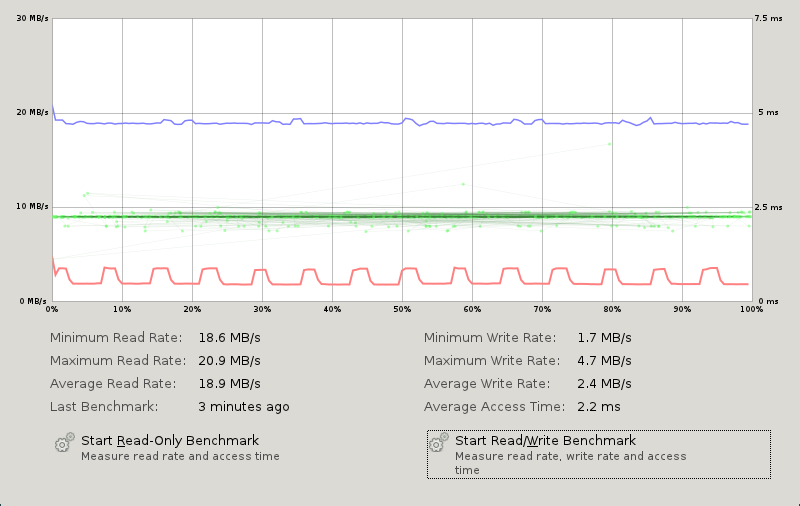
Résultats de dd: 15997075456 octets (16 GB) copiés en 6491,87 s (1h48) soit 2,5 MB/s.
Performance en lecture (courbe bleue):
Performance en écriture (courbe rouge):
Temps d’accès moyen: 2,2ms (courbe verte)
Résultats de dd: 15931539456 octets (16 GB) copiés en 4934,48 s (1h22) soit 3,2 MB/s
Performance en lecture (courbe bleue):
Performance en écriture (courbe rouge):
Temps d’accès moyen: 1,6ms (courbe verte)
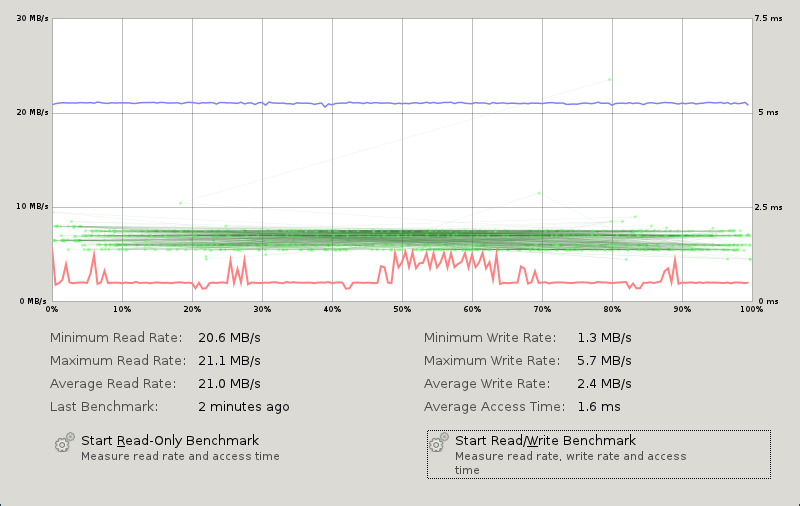
Ces deux cartes se valent à peu prés, avec un léger avantage pour la carte SanDisk.
I did just yesterday !
I was hacking on fluxbox and rebuilding the package to test directly on my system.
When I was happy with my changes I thought, I should write a patch for this…
But guess what ! With format 3.0 (quilt) it was already there, in the debian/patch directory, just waiting to be renamed and completed with a nice DEP-3 header !
It is a lot more easy to contribute with those tools!
So thank you debian folks !
As usual debian’s wiki is a great resource, look it’s page about Synaptics Touchpad and most of the configuration is done.
So here I got the finger tap to work, but is spite of my efforts, the two finger scroll would not work. Well actually it did work using synclient but it was lost by next restart… And the hint was on the wiki but on Elantech Touchpad‘s page, near the end, in “GUI assistance” section: “Beware that they can override the global X settings in xorg.conf.”
So if you’re using gnome, look at the Mouse setting in gnome menu. You can also try gsynaptics, but while gnome mouse settings are reloaded each time you switch VT or suspend the computer, gsynaptics has to be reloaded manually.
Gnome didn’t let me check the two finger scroll option, so I opened gconf-editor searched for the touchpad key and found it as /desktop/gnome/peripherals/touchpad and changed scroll_method to 2. It’s still grey in the menu, but it’s checked an it works!
There is one remaining issue with gnome, if you want a different button for 2 finger tap than button 3, you can’t! I first fell on the fedora bug report about it which lead me to gnome’s one. So as of today, there is a patch, but not integrated in gnome, and I did not test it.
So I was tempted to switch to my old wm fluxbox, but didn’t take the time to configure it yet. Also reading Who-T’s blog, and especially this post xmodmap keyboard deconfiguration made me think that configuring one’s desktop trough Gnome and the like is going to be “the right way” in near future. As fluxbox session is just a plain bash script, we’ll need more working CLI tools for the hotplug configuration…
Well to come back, the touchpad is not going to be hotplug so a plain old config file like xorg.conf should in my opinion remain a valid choice (especially now that it does no goes through some other xml stuff as with hal). But then, the desktop configuration (ie Gnome) shouldn’t mess with it as it’s doing now!
As already stated in the previous post update I’m now using the method described on debian eeepc wiki for booting in native resolution, so I’m no longer using the IEGD driver (nor my xserver by the way).
I find it a lot more stable !
I no longer have the issues with the mouse cursor jumping randomly to the lower right corner.
I even configured the touchpad to use the tap to click mode and the two finger scroll mode. (This will be the subject of a following post)
One more thing about using 915resolution in grub2, if like me you find that windows no longer want to boot, then only load 915resolution.mod before loading the linux kernel and not at grub startup.
You can do that by adding the following lines in /etc/grub.d/10_linux.
	echo insmod 915resolution
	echo 915resolution 58 1366 768 32
Instead of creating the /etc/grub.d/01_915resolution file.
I did place it at the end of the if block testing the GRUB_GFXPAYLOAD_LINUX variable.
Hope this will help some of you !
I’ve recently learned to use git (for my xorg adapted packages) and used it later for netsed.
In order to develop UDP in netsed, I had to try several stuff, my network programming experience in C is back to some school time, so this was really trial and errors. And here git really helps, all I had to do is create branches for each trial, so I don’t loose any tracks I’ve taken, then when I found the right way to do it, I could just merge or cherry pick from the branches (or even just copy past from gitk to my favorite editor gvim) and that was it !
Of course I can now delete the trial branches, but those were really helpful during development time.
This meant abusing of git commit --amend, git merge ( --squash ) and git cherry-pick commands, but well you cannot build a clean code without effort.
I should probably give another look at git stash which seams to fill similar needs.
The first reference for installing debian on an Eee PC is The Debian Eee PC project. However it says on
its models page that it does not fully support 1201HA, because it uses the Poulsbo chipset. The reason is that it’s not supported by mainstream debian: see #533450 for details…
However installing debian Squeeze (testing) using the debian installer snapshot was fearly easy. Read DebianEeePC/HowTo/InstallUsingStandardInstaller for details.
The only noticeable issues I had was with partitioning where the partition table was not reloaded by the kernel; and grub that installed itself on my installation USB Key instead of the primary drive.
A good point is that network and wifi worked out of the box. So then I needed X to work with the native resolution.
Reading the above bugreport and a few other website showed that there are two drivers out there. One poulsbo driver (that seams to come from ubuntu) and the intel IEGD driver. Nobody seams to maintain the first one, and the second is proprietary but at least works. However none work with the 1.7 version of xserver. So the first step is to get an older xserver.
Lenny has and old one but downgrading all X related packages (including gnome ones) was a pain, so I quickly switched to an other solution:
Rebuilding and xserver 1.6 package.
See next post for details on building the xserver 1.6 packages.
This solution worked fine with the IEDG 10.3 driver.
I’m still experiencing some X freeze from time to time (which are solved only by rebooting). The touchpad does not have the multifinger features I was used to, and sometime the cursor jump to the lower right corner, but I didn’t really tried to investigate this anyway.
Update
As Steve McIntyre pointed out there is an other way to get the native resolution, using grub2 and fbdev, see http://wiki.debian.org/DebianEeePC/Model/1101HA for details.
I just updated to this configuration and it works !
J’ai simplement installé le paquet « sun-java6-plugin », j’avais déjà mon certificat (importé de firefox sous windows), et je n’ai eu aucune difficulté pour la signature.
En revanche j’ai eu droit à quelques erreurs de segmentations de iceweasel.
Et évidement le site ne reconnais pas iceweasel, mais ça passe.
Un dernier point, j’ai remarqué un problème d’affichage sur la page de résumé, et les boutons de signature/envoi, peut être dû aux onglets Adblock… ou a un bug…
Sinon avant de m’y mettre j’ai constater que certains avait eu plus de difficulté que moi l’an dernier, (en fait j’ai même commencé par installer sun-java5-plugin, mais ça ne marchait pas!).
Les détails
ici sur le blog d’Olivier Berger.
If you are storing your music file on your home server’s hard drive, so why don’t you play it from here ?
That’s just what I did, especially with the SPDIF output on the server’s motherboard connected to my sound system, that would have been a waste not to use it!
But it’s a server, it has no screen, no keyboard…
You can play your music using mpg321 from an ssh connection, you can even use screen, that would work. But there is a nice program that’s even better for that case: Music Player Deamon aka MPD
Le wifi en wep sur un mac, ça marche… mais si la borne n’est pas sur le canal 11, c’est très, très lent!
Merci à robertito du forum macbidouille.
Voila après avoir perdu une bonne heure là-dessus ça méritait bien un petit billet.